Bug #1099
closedMissing menu items in Mint or other system that have outdated Qt Frameworks packages
0%
Description
- The name of the last "showed toolbar" inside Preferences menu does not appear, only the mark enabled. The first 2 of them: Navigation toolbar and URL Toolbar are ok. So, I want to disable this toolbar and uncheck it and the bookmarks go away, but when I put the full screen and then go to the normal size, the bookmarks appear again and again the mark checked.
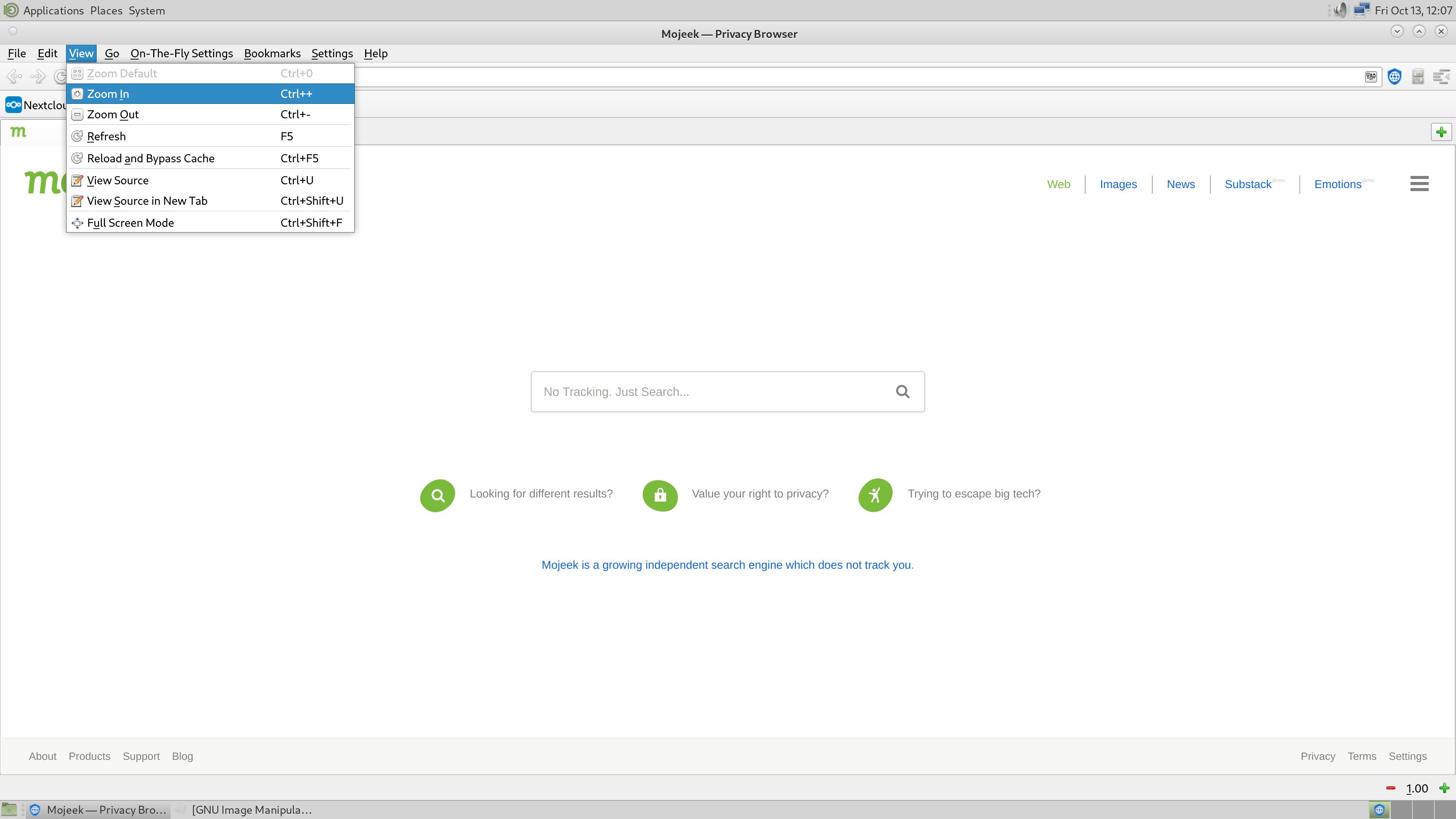
- Not all the menus in View that are commented in your website appear: "zoom buttons", "View source", and "View rendered website in new tab", but they can be used in a different way.
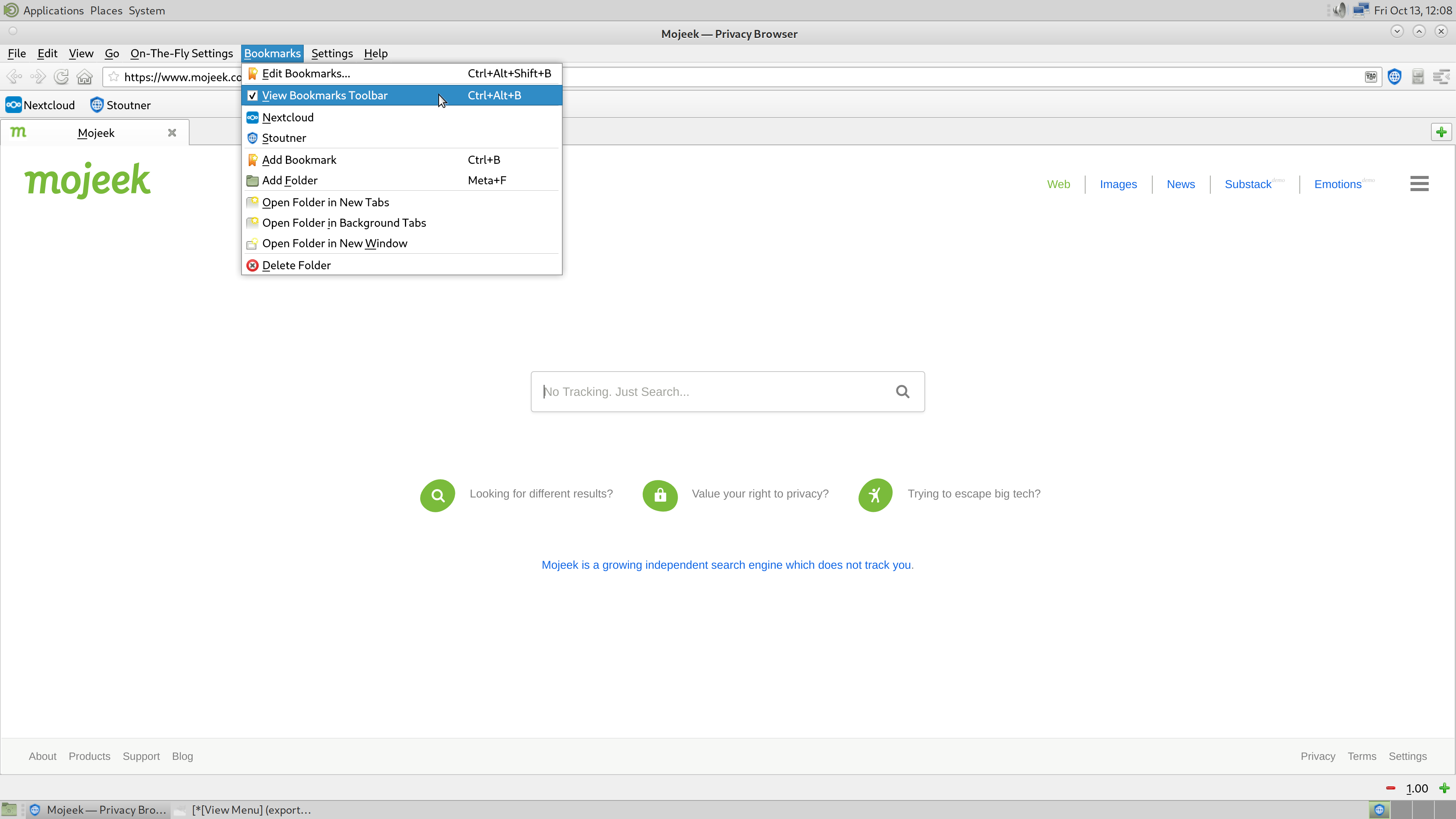
- This option does not appear in Bookmarks: "View Bookmarks Toolbar", it appears in Preferencees, as I said in my first answer, with no name and the toolbar always checked.
I'm using Linux with Mint Mate.
Files
| ui_standards.rc (6.59 KB) ui_standards.rc | Debian testing ui_standards.rc file. | ||
| Bookmarks Menu.png (308 KB) Bookmarks Menu.png | |||
| View Menu.png (240 KB) View Menu.png | |||
| ui_standards.rc (6.56 KB) ui_standards.rc | |||
| Menu Screenshot.png (27.3 KB) Menu Screenshot.png |
Updated by Soren Stoutner about 2 years ago
- File ui_standards.rc ui_standards.rc added
- Subject changed from Bugs in 0.5 to Missing Items in View and Bookmarks Menus
- Status changed from New to Feedback
- Assignee set to Soren Stoutner
- Priority changed from 3.x to Next Release
Please file a separate bug report for each issue. It makes tracking when they are fixed easier. I will deal with the missing items in the View and Bookmarks menus with this bug report. The system toolbar context menu missing entry is probably something separate.
I am curious if there are some missing entries from your system `ui_standards.rc` file (see attached). On Debian, this file is located in `/etc/xdg/ui`, but it might be in a different place on Mint. Can you post a copy of the file your system has?
Updated by Soren Stoutner about 2 years ago
I should note that I have tested Privacy Browser PC on Debian testing running MATE as the desktop environment, so whatever the problems are, they aren't a general incompatibility with MATE.
Updated by Soren Stoutner about 2 years ago
- File Bookmarks Menu.png Bookmarks Menu.png added
- File View Menu.png View Menu.png added
Updated by snort snort about 2 years ago
- File ui_standards.rc ui_standards.rc added
Soren Stoutner wrote in #note-2:
I should note that I have tested Privacy Browser PC on Debian testing running MATE as the desktop environment, so whatever the problems are, they aren't a general incompatibility with MATE.
Yes, the file is in /etc/xdg/ui
Attached
So, must I replace it with yours?
Updated by snort snort about 2 years ago
snort snort wrote in #note-4:
Soren Stoutner wrote in #note-2:
I should note that I have tested Privacy Browser PC on Debian testing running MATE as the desktop environment, so whatever the problems are, they aren't a general incompatibility with MATE.
Yes, the file is in /etc/xdg/ui
AttachedSo, must I replace it with yours?
Well, I'm not used to do these things. Please, do it yourself. I'll read what you'll post.
I replaced your file deleting mine in the same route and nothing changed in the browser when I closed it and opened it again.
Thanks
Updated by Soren Stoutner about 2 years ago
Yours is a slightly older version (21 vs. 22) as seen on line 2 of the file. However, all the important entries for creating these two menus are already in version 21, so this isn't the problem.
Updated by Soren Stoutner about 2 years ago
In the screenshot you sent me on Mastodon it showed the menus in Spanish. If you switch your system language to English does the problem persist?
Updated by snort snort about 2 years ago
Soren Stoutner wrote in #note-7:
In the screenshot you sent me on Mastodon it showed the menus in Spanish. If you switch your system language to English does the problem persist?
Yes, done and the problem persists
Updated by Soren Stoutner about 2 years ago
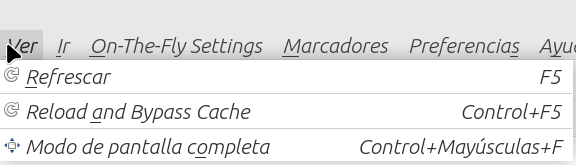
- File Menu Screenshot.png Menu Screenshot.png added
I'm trying to figure out something about your system that is different than all the systems I have tested on. So far, nothing has seemed significant.
This is what is so fascinating to me: in the screenshot you sent me (attached), the Refresh (Refrescar) menu item is populated, but the Zoom In and Zoom Out entries above it are not. This seems significant to me because all three are both populated by KStandardAction as seen on lines 75-77 of the following file:
On Debian, KStandardAction is shipped as part of the libkf5configwidgets5 package. I currently have version 5.107.0-2 installed.
https://packages.debian.org/search?keywords=libkf5configwidgets5
Linux Mint might name these packages differently. You are looking for whatever installs the following file:
/usr/lib/x86_64-linux-gnu/libKF5ConfigWidgets.so.5
Do you know which version of this file you have installed on your system?
Updated by snort snort about 2 years ago
Soren Stoutner wrote in #note-9:
I'm trying to figure out something about your system that is different than all the systems I have tested on. So far, nothing has seemed significant.
This is what is so fascinating to me: in the screenshot you sent me (attached), the Refresh (Refrescar) menu item is populated, but the Zoom In and Zoom Out entries above it are not. This seems significant to me because all three are both populated by
KStandardActionas seen on lines 75-77 of the following file:On Debian, KStandardAction is shipped as part of the
libkf5configwidgets5package. I currently have version 5.107.0-2 installed.https://packages.debian.org/search?keywords=libkf5configwidgets5
Linux Mint might name these packages differently. You are looking for whatever installs the following file:
/usr/lib/x86_64-linux-gnu/libKF5ConfigWidgets.so.5
Do you know which version of this file you have installed on your system?
I suppose it's this:
libKF5ConfigWidgets.so.5: symbolic link to libKF5ConfigWidgets.so.5.92.0
Updated by Soren Stoutner about 2 years ago
Version 92 is a little more than a year old. That might be enough to cause a problem.
I'm guessing you are using a version based on Ubuntu Jammy.
https://linuxmint.com/download_all.php
Do you have an easy way of installing newer packages on Mint without disrupting your system?
Updated by snort snort about 2 years ago
Soren Stoutner wrote in #note-11:
Version 92 is a little more than a year old. That might be enough to cause a problem.
I'm guessing you are using a version based on Ubuntu Jammy.
https://linuxmint.com/download_all.php
Do you have an easy way of installing newer packages on Mint without disrupting your system?
I don't know how.
But don't worry about it. As I said before I'm ok now using it in a differebt way.
Thanks
Updated by Soren Stoutner about 2 years ago
- Subject changed from Missing Items in View and Bookmarks Menus to Missing menu items in Mint
- Priority changed from Next Release to 3.x
OK. My guess is that these problems resolve themselves with the next major release of Mint. I'm going to leave this bug report open and you can let us know if that fixes it.
Updated by snort snort about 2 years ago
Soren Stoutner wrote in #note-13:
OK. My guess is that these problems resolve themselves with the next major release of Mint. I'm going to leave this bug report open and you can let us know if that fixes it.
You're right. I just tested it with the new Linux ElementaryOS from a live usb and it works all ok.
Thanks
Updated by Soren Stoutner about 2 years ago
- Subject changed from Missing menu items in Mint to Missing menu items in Mint or other system that have outdated Qt Frameworks packages
- Status changed from Feedback to Closed
Thanks for the followup information.
Eventually, Mint will ship with a version of Privacy Browser.
https://repology.org/project/privacybrowser/packages
When a LTS version of Ubuntu ships with Privacy Browser, it should get rolled into the next Mint release. That version should work well with Mint, although newer versions might have problems until a subsequent Mint release.